🟡 Python 4차 강의 🟡
✅ 딕셔너리
🔰 dictionary ?
- 키(key)와 값(value)의 쌍을 저장하는 자료형
- 변경 가능(mutable) : 생성 후에도 요소의 추가, 삭제, 변경이 가능
- 키는 고유(unique) : 한 딕셔너리 내에서 키는 중복될 수 없음
- 키는 불변(immutable) 자료형이어야 함 : 문자열, 숫자, 튜플 등이 키로 사용
- 값은 어떤 자료형도 가능 : 리스트, 딕셔너리 등 가변 자료형도 값으로 사용
# 기본적인 딕셔너리 생성
student = {
    'id': 12345,
    'name': 'John Doe',
    'grade': 'A'
}

# 키워드 인자를 사용한 생성
car = dict(brand='Ford', model='Mustang', year=1964)
print(car)
*>>>
{'brand': 'Ford', 'model': 'Mustang', 'year': 1964}*

# 리스트나 튜플의 리스트를 사용한 생성
items = [('apple', 2), ('banana', 3)]
fruit_dict = dict(items)
print(fruit_dict)
*>>>
{'apple': 2, 'banana': 3}*
🔰 딕셔너리 요소 접근 및 변경
- 요소 접근 : 키(key)값, get()
person = {'name': 'Alice', 'age': 25, 'city': 'New York'}

# 키를 사용하여 값에 접근
print(person['name'])  # 출력: Alice
print(person['age'])   # 출력: 25

# `get()` 메서드를 사용하여 값에 접근 (키가 없을 때 기본값 설정 가능)
print(person.get('city'))       # 출력: New York
print(person.get('country'))    # 출력: None
print(person.get('country', 'USA')) # 출력: USA- 요소 변경
person['age'] = 26
print(person) # 출력: {'name': 'Alice', 'age': 26, 'city': 'New York'}- 요소 추가
person['country'] = 'USA'
print(person) # 출력: {'name': 'Alice', 'age': 26, 'city': 'New York', 'country': 'USA'}- 요소 삭제 : del, pop(), clear()
# `del` 키워드를 사용하여 요소 삭제
del person['city']
print(person)  # 출력: {'name': 'Alice', 'age': 26, 'country': 'USA'}

# `pop()` 메서드를 사용하여 요소 삭제 및 값 반환
age = person.pop('age')
print(age)     # 출력: 26
print(person)  # 출력: {'name': 'Alice', 'country': 'USA'}

# 모든 요소 삭제
person.clear()
print(person)  # 출력: {}
🔰 딕셔너리 메서드
- keys() : 딕셔너리의 모든 키 반환
person = {'name': 'Alice', 'age': 25, 'city': 'New York'}
keys = person.keys()
print(keys)  # 출력: dict_keys(['name', 'age', 'city'])
# key() 메서드를 통한 for 반복
for key in person.keys():
    print(key)
- values() : 딕셔너리의 모든 값을 반환
values = person.values()
print(values)  # 출력: dict_values(['Alice', 25, 'New York'])
# values() 메서드를 통한 for 반복
for value in person.values():
    print(value)
- items() : 딕셔너리의 모든 키-값 쌍을 튜플로 반환
items = person.items()
print(items)  # 출력: dict_items([('name', 'Alice'), ('age', 25), ('city', 'New York')])
# items() 메서드를 통한 for 반복
for key, value in person.items():
    print(f'{key}: {value}')
- 키를 통한 for 반복
for key in person:
    print(key, person[key])
🔰 딕셔너리 함수
- len() :딕셔너리의 키-값 쌍의 개수를 반환
person = {'name': 'Alice', 'age': 26, 'city': 'New York', 'country': 'USA'}
print(len(person))  # 출력: 4
- in 연산자 : 딕셔너리에 특정 키가 존재하는지 확인
print('name' in person)     # 출력: True
print('email' in person)    # 출력: False
- del 키워드 : 딕셔너리 자체를 삭제하거나 모든 요소를 삭제
🔰
▶ 키로 사용할 수 없는 자료형
- 리스트나 다른 딕셔너리 등 가변(mutable) 자료형은 키로 사용할 수 없습니다.
- 가변 자료형 : list, set, dict
- 불변 자료형 : int, float, bool, tuple, string
▶ 중첩 딕셔너리 (Nested Dictionaries)
students = {
    'student1': {'name': 'Alice', 'age': 25},
    'student2': {'name': 'Bob', 'age': 22},
    'student3': {'name': 'Charlie', 'age': 23}
}

# 특정 학생의 정보에 접근
print(students['student2']['name'])  # 출력: Bob

# 중첩 딕셔너리의 반복
for student_id, info in students.items():
    print(f'ID: {student_id}')
    for key, value in info.items():
        print(f'  {key}: {value}')
▶ 딕셔너리 컴프리헨션 (Dictionary Comprehension)
new_dict = {key_expression: value_expression for item in iterable}
Ex) 1부터 5까지의 숫자를 키로 하고, 그 제곱을 값으로 하는 딕셔너리 생성
squares = {x: x**2 for x in range(1, 6)}
print(squares)  # 출력: {1: 1, 2: 4, 3: 9, 4: 16, 5: 25}
Ex) 기존 딕셔너리에서 특정 조건에 맞는 요소만 필터링
original = {'apple': 2, 'banana': 3, 'cherry': 5, 'date': 4}
filtered = {k: v for k, v in original.items() if v % 2 == 0}
print(filtered)  # 출력: {'apple': 2, 'date': 4}
▶ 람다 (lambda) 함수
- 익명(anonymous) 한 줄 함수
- def 로 정의한 이름 있는 함수와 기능은 같지만,
- 한 줄로 표현식 하나만 쓸 수 있고
- 이름을 붙이지 않아도 되므로 즉석에서 전달하기 편리
- 주로 map, filter, sorted, max/min처럼 함수를 인자로 받는 곳에서 “간단한 기준”을 만들 때 사용
lambda 매개변수들: 표현식# 같은 의미
square = lambda x: x * x # 람다
def square(x): return x * x # def✅ 함수
🔰 function ?
반복해서 사용할 코드를 함수로 정의 ⇒ 필요할 때마다 함수 이름을 호출하는 것만으로 해당 코드를 실행
def 함수이름(매개변수1, 매개변수2, ...):
    # 함수가 수행할 문장들
    # ...
    return 반환값
- def 키워드 뒤에 함수 이름 기재
- 괄호 안에 함수가 사용할 매개변수(parameter)를 정의. 생략⭕
- 함수 내부의 코드는 들여쓰기로 구분하며, return 문을 사용하여 함수 결과를 반환
- return 문은 생략⭕, 이 경우 함수는 None을 반환
▶ 매개변수(Parameters)와 인자(Arguments)
- 매개변수(Parameter) : 함수를 정의할 때 함수 내부로 전달받을 수 있는 변수. 즉, 함수 선언부에 이름을 붙여 놓은 것들.
- 인자(Argument) : 함수를 호출할 때 실제로 넘기는 값. 호출 시 매개변수에 대응하는 실제 데이터를 인자로 전달.
def add(a, b):  # a, b는 매개변수(parameter)
    return a + b

result = add(3, 5)  # 3과 5는 인자(argument)
print(result)  # 출력: 8
▶ 반환값(Return Value)
- 함수는 return 키워드를 통해 실행 결과를 호출한 곳으로 되돌려줌
- return 키워드를 만나면 함수는 즉시 종료되고, 그 뒤의 코드는 실행❌
- 반환값은 0개, 1개 또는 여러 개일 수도 있음
Ex) return 없는 함수
def greet(name):
    print("Hello,", name)
    # return 문이 없으므로 None 반환

greet("Alice")  # "Hello, Alice"를 출력하고 반환값은 None
Ex) return 1개인 함수
def square(x):
    return x * x

result = square(4)
print(result)  # 16
Ex) return 여러 개인 함수
def divide_and_remainder(a, b):
    quotient = a // b  # 몫
    remainder = a % b  # 나머지
    return quotient, remainder

q, r = divide_and_remainder(10, 3)
print("몫:", q)   # 몫: 3
print("나머지:", r) # 나머지: 1
▶ 매개변수 전달 방식
1. 기본 매개변수(Default Parameter) : 매개변수에 기본값을 설정
def greet(name, message="Hello"):
    print(message, name)

greet("Alice")        # "Hello Alice" - message에 기본값 사용
greet("Bob", "Hi")     # "Hi Bob"
2. 키워드 인자(Keyword Arguments) : 함수 호출 시 매개변수 이름을 명시하여 인자를 전달
def introduce(name, age):
    print("이름:", name)
    print("나이:", age)

introduce(name="Charlie", age=25)
introduce(age=30, name="Diana")  # 순서를 바꿔도 명시적이라 오류 없음
3. 가변 인자(*args) : 몇 개의 인자가 들어올지 모를 경우, args를 사용하면 인자를 튜플 형태로 받을 수 있음
def sum_all(*args):
    total = 0
    for num in args:
        total += num
    return total

print(sum_all(1, 2, 3))    # 6
print(sum_all(10, 20))     # 30
print(sum_all())           # 0
4. 키워드 가변 인자(**kwargs) : 키워드 인자를 딕셔너리 형태로 받을 수 있음
def print_info(**kwargs):
    for key, value in kwargs.items():
        print(key, ":", value)

print_info(name="Eve", age=22, hobby="reading")

*>>>
name : Eve
age : 22
hobby : reading*
🔰
▶ 람다 함수(Lambda Function)
lambda 키워드를 사용하여 한 줄로 함수를 정의하는 방법
주로 간단한 연산을 위해 사용되며, 익명 함수라고도 함
# 일반 함수
def add(a, b):
    return a + b

# 람다 함수
add_lambda = lambda a, b: a + b

print(add(3, 5))         # 8
print(add_lambda(3, 5))  # 8
▶ 지역 변수 vs 전역 변수
- 지역 변수(local) : 함수 안에서 선언된 변수
- 전역 변수(global) : 함수 밖에서 선언된 변수
두 함수는 유효한 범위(scope) 가 다름
x = 10  # 전역 변수

def my_func():
    x = 5  # 지역 변수
    print("함수 내부:", x)

my_func()         # 함수 내부: 5
print("함수 외부:", x)  # 함수 외부: 10
▶ 함수 예제
Ex)
- 학생들의 점수를 처리하는 프로그램을 작성
- 학생들의 점수 리스트가 있을 때, 이 점수들의 평균을 구하는 함수 calculate_average를 정의,
- 평균 점수를 기준으로 등급을 매기는 함수 get_grade를 정의한 뒤,
- 이를 통해 학생에게 맞는 평가를 출력하는 로직을 작성
def calculate_average(scores):
    """점수 리스트를 받아 평균을 반환하는 함수"""
    if not scores:  # 만약 리스트가 비어있다면 처리
        return 0
    return sum(scores) / len(scores)

def get_grade(score):
    """점수를 받아 A, B, C, D, F 등급을 반환하는 함수"""
    if score >= 90:
        return "A"
    elif score >= 80:
        return "B"
    elif score >= 70:
        return "C"
    elif score >= 60:
        return "D"
    else:
        return "F"

# 테스트 코드
student_scores = [88, 92, 79, 65, 100]
avg_score = calculate_average(student_scores)
student_grade = get_grade(avg_score)

print("평균 점수:", avg_score)       # 예: 평균 점수: 84.8
print("학생 등급:", student_grade)  # 예: 학생 등급: B
🔰 과제
실습 01
더보기
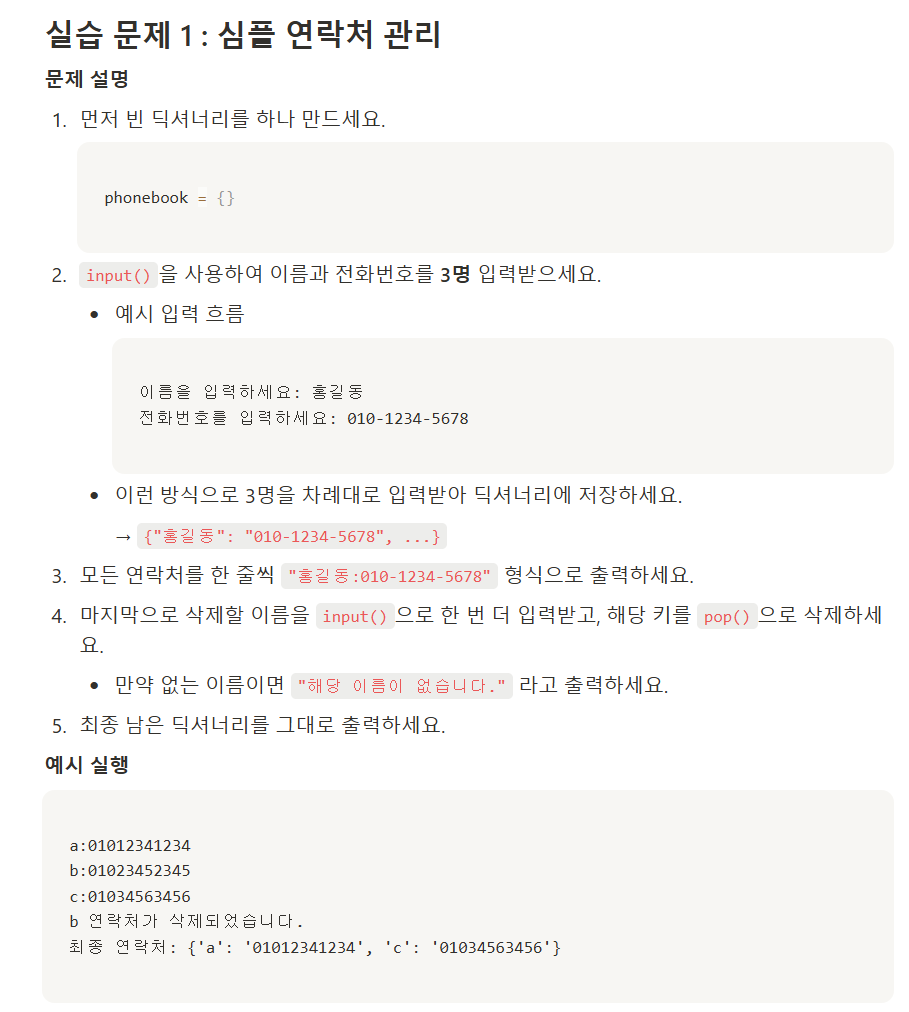
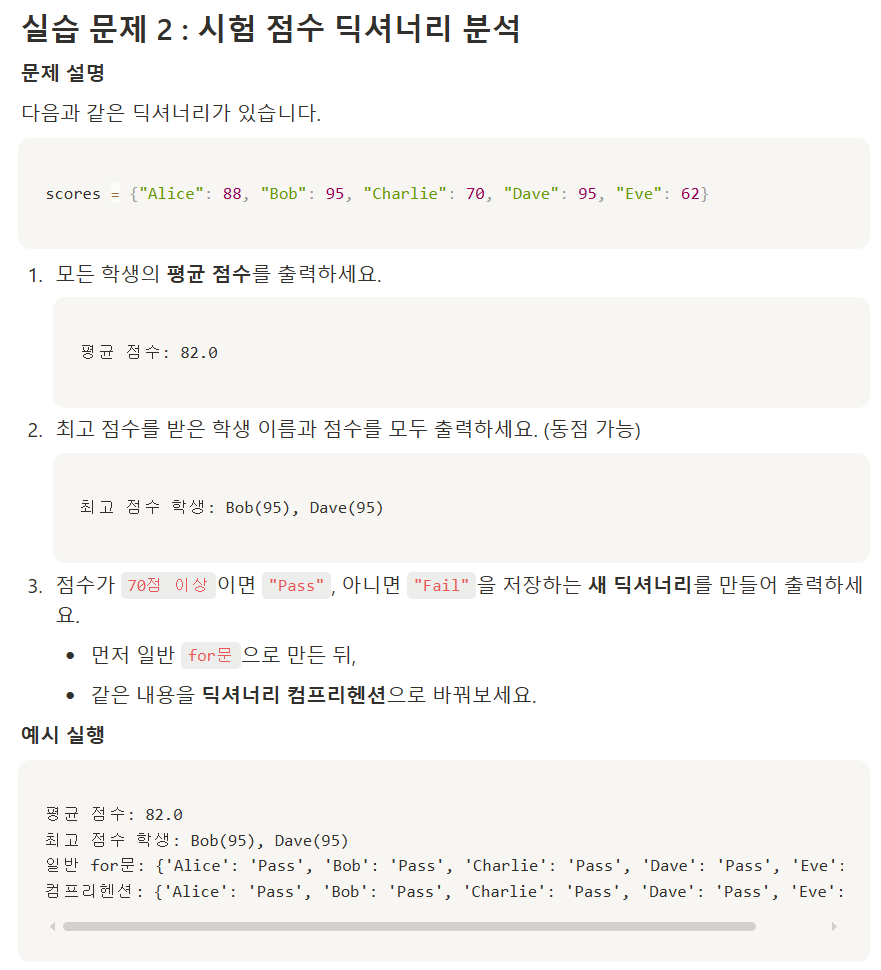

1)
for i in range(1,4):
    user_name = input("이름을 입력하세요 : ")
    user_phone = input("전화번호를 입력하세요 : ")
    new_phone = user_phone[:3] + "-" + user_phone[3:7] + "-" + user_phone[-4:]
    print(f"=> {user_name} : {new_phone}")
    phonebook[user_name] = new_phone

removeinput = input("삭제할 이름을 입력하세요 : ")
if removeinput not in phonebook:
    print("해당 이름이 없습니다.")
else:
    removenum = phonebook.pop(removeinput)


print(phonebook)
2)
scores = {"Alice" : 88, "Bob" : 95, "Charlie" : 70, "Dave" : 95, "Eve" : 62}
max_score = max(scores.values())
max_key = [key for key, value in scores.items() if value == max_score]
print(max_key)      # 출력 : ['Bob', 'Dave']

avg_scroe = sum(scores.values()) / len(scores)
print("평균 점수 : ", avg_scroe)

#for i in max_key:
#    print(i,'(',max_score,')', sep=''.replace('\n',','))   # 엔터해서 안나오게 하려고 개똥꼬쇼했는데, join이 답이었음
print("최고 점수 학생 :", ', '.join(f"{i}({max_score})" for i in max_key))

'''
for i, j in scores.items():
    if j >= 70:
        scores[i] = "Pass"
    else:
        scores[i] = "Fail"
'''
print(scores)

new_score = {key: ("Pass" if value >= 70 else "Fail") for key, value in scores.items()}
print(new_score)
3)
products = {
    "Keyboard": 49_000,
    "Monitor": 219_000,
    "Mouse": 25_000,
    "Speaker": 49_000,
    "Webcam": 89_000
}

# operator.itemgetter
d1 = sorted(products.items(), key=operator.itemgetter(1), reverse=True)
print(d1)

# lambda
d2 = sorted(products.items(), key = lambda x: x[1], reverse=True)
print(d2)
실습 02
더보기

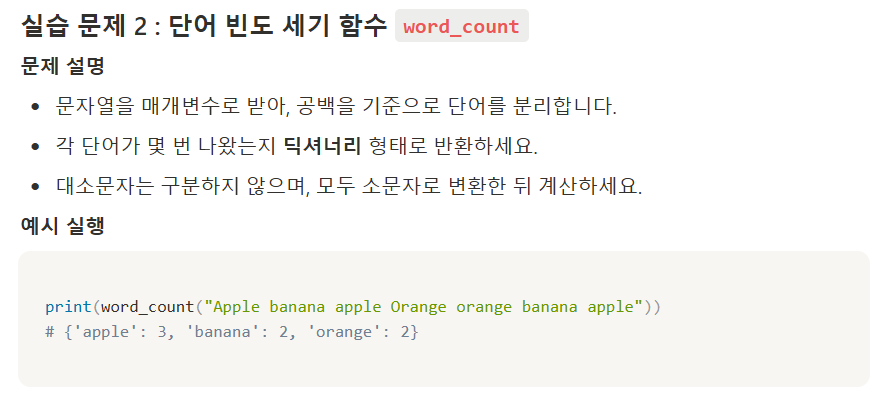
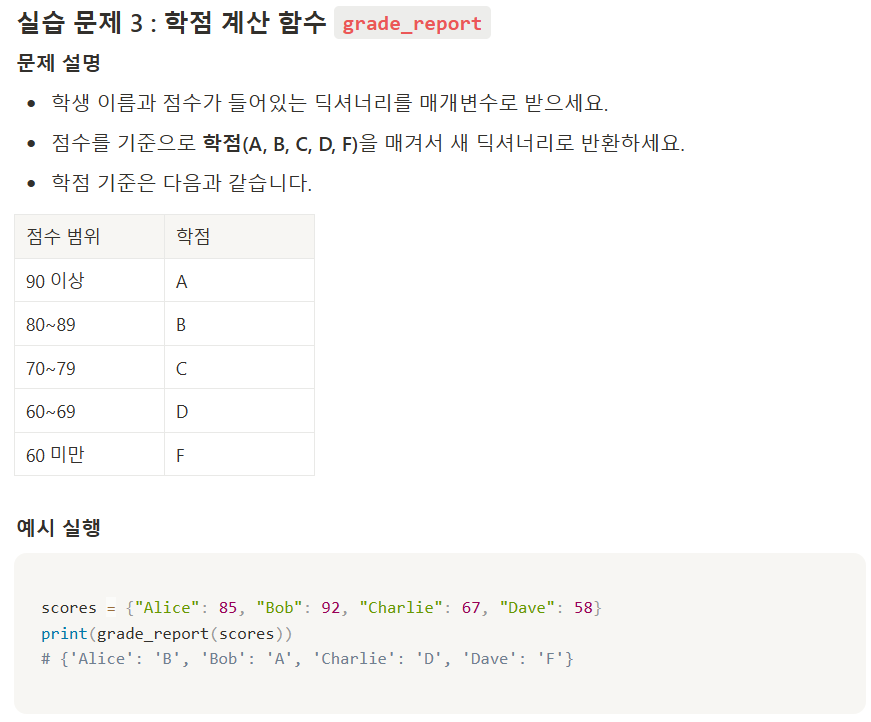
1)
mylist = [1,2,3,4,5]
blanklist = []

def list_sum(userlist):
    count = 0
    for i in userlist:
        count += i
    return count

print(list_sum(mylist))
print(list_sum(blanklist))
2)
def word_count(word):
    new_word = word.lower().split()
    mydic = {}
    for i in new_word:
        count = new_word.count(i)
        mydic[i] = count
    return mydic

print(word_count("apple banana apple pineapple orange BANANA"))
3)
scores = {"Alice" : 85, "Bob" : 92, "Charlie" : 67, "Dave" : 58}

def grade_report(score_dict):
    for i, j in score_dict.items():
        if j >= 90:
            score_dict[i] = "A"
        elif 80 <= j < 90:
            score_dict[i] = "B"
        elif 70 <= j < 80:
            score_dict[i] = "C"
        elif 60 <= j < 70:
            score_dict[i] = "D"
        else:
            score_dict[i] = "F"
    return score_dict

print(grade_report(scores))
미니과제
더보기
# %% [markdown]
# ## 문제 1
# 다음과 같은 정보를 담은 딕셔너리 person을 생성하고, 'name' 키를 이용해 값을 출력하세요.
#
# - 키: 'name', 값: '홍길동'
# - 키: 'age', 값: 30
# - 키: 'city', 값: '서울'

# %%
person = {"name" : "홍길동", "age" : 30, "city" : "서울"}
print(person["name"])

# %% [markdown]
# ## 문제 2
# 다음 딕셔너리 person = {'name': '홍길동', 'age': 30}가 있을 때, 'city' 키에 해당하는 값을 get() 메서드를 사용하여 가져오되, 키가 없을 경우 'Unknown'을 반환하도록 하세요.

# %%
person = {"name" : "홍길동", "age" : 30}

print(person.get("city", "Unknown"))    # 검색함. 원래는 None 출력됨


# %% [markdown]
# ## 문제 3
# car = {'brand': 'Ford', 'model': 'Mustang'}가 있을 때, 'year' 키를 1964로 추가하고, 'model' 값을 'Thunderbird'로 변경하세요.

# %%
car = {'brand': 'Ford', 'model': 'Mustang'}
car["year"] = 1964
print(car)

car["model"] = "Thunderbird"
print(car)

# %% [markdown]
# ## 문제 4
# 문제: fruit = {'apple': 2, 'banana': 3, 'cherry': 5}가 있을 때, 'banana' 키-값 쌍을 제거하고, 제거된 값을 출력한 뒤 딕셔너리를 확인하세요.

# %%
fruit = {'apple': 2, 'banana': 3, 'cherry': 5}
fruit.pop("banana")

print(fruit)

# %% [markdown]
# ## 문제 5
# person = {'name': 'Alice', 'age': 25, 'city': 'New York'}에 대하여, key 값들과, value 값들, 그리고 key와 value 값 동시(items)에 출력하세요.

# %%
person = {'name': 'Alice', 'age': 25, 'city': 'New York'}

# ? 문제가 무슨 소리인건지 이해가 안됨

# %% [markdown]
# ## 문제 6
# 문제: d = {'a': 1, 'b': 2}가 있을 때, 다른 딕셔너리 d2 = {'b': 3, 'c': 4} 로 업데이트하고, 결과를 출력하세요.

# %%
d = {'a': 1, 'b': 2}
d2 = {'b': 3, 'c' : 4}

print(d2)

# %% [markdown]
# ## 문제 7
# person = {'name': 'Alice', 'age': 25, 'city': 'New York'}를 순회하여 key, value 값을 출력해보세요. (반복문, items 사용)

# %%
예상 출력 :

name Alice
age 25
city New York

# %%
person = {'name': 'Alice', 'age': 25, 'city': 'New York'}

for i, j in person.items():
    print(i,j)


# %% [markdown]
# ## 문제 8
# 1부터 5까지의 숫자를 키로 하고, 각 숫자의 세제곱을 값으로 하는 딕셔너리를 딕셔너리 컴프리헨션을 사용하여 만드세요. (반복문 사용)

# %%
# 미사용
'''
blank = {}
for i in range(1,6):
    blank[i] = i**3
print(blank)
'''

#사용
# blank2 = {i for i in range(1,6) blank[i] = i**3}  틀린 문법
# 딕셔너리 컴프리헨션 문법인 {key: value for ...} 를 써야함
blank2 = {i:i**3 for i in range(1,6)}
print(blank2)

# %% [markdown]
# ## 문제 9
# prices = {'apple': 2.5, 'banana': 1.8, 'cherry': 3.0}에서 가격이 2.0 이상인 과일만을 담은 딕셔너리를 딕셔너리 컴프리헨션을 이용하여 만드세요. (반복문/조건문 사용)

# %%
prices = {'apple': 2.5, 'banana': 1.8, 'cherry': 3.0}
# 미사용
'''
new_dict = {}

for i, j in prices.items():
    if j >= 2.0:
        new_dict[i] = j

print(new_dict)
'''

# 사용
new_dict2 = {i:j for i,j in prices.items() if j>= 2.0}
print(new_dict2)


# %% [markdown]
# ## 문제 10
# person = {'name': 'Alice', 'age': 25, 'city': 'New York'}에서 'name' 키가 존재하는지, 'email' 키가 존재하는지 확인하세요! (in 연산자 사용)

# %%
print("name" in person)
print("email" in person)

# %% [markdown]
# ## 문제 11
# student2의 'age' 값 중 20의 값을 출력하세요.

# %%
students = {
    'student1': {'name': 'Alice', 'age': [25, 26, 27, 28, 29]},
    'student2': {'name': 'Bob', 'age': [18, 19, 20, 21, 22]},
    'student3': {'name': 'Charlie', 'age': 23}
}

# %%
students = {
    'student1': {'name': 'Alice', 'age': [25, 26, 27, 28, 29]},
    'student2': {'name': 'Bob', 'age': [18, 19, 20, 21, 22]},
    'student3': {'name': 'Charlie', 'age': 23}
}

print(students['student2']['age'])

# %% [markdown]
# # 응용

# %% [markdown]
# ## 문제 1
# 키로 사용할 수 없는 자료형은 아래에서 모두 고르세요.

# %%
my_dict = {
    [1, 2, 3]: 'This is a list',   --------------------- 1
    'name': 'Alice', --------------------- 2
    (2, 4) : 'hello', --------------------- 3
    {'age' : 24} : 'pink', --------------------- 4
    5 : 'temp int', --------------------- 5
    True : 'False' --------------------- 6
}

# %%
4, 5, 6

# %% [markdown]
# ## 문제 2
# 아래와 같은 딕셔너리가 있을 때, 'salary'가 높은 순으로 정렬한 딕셔너리를 출력하세요.

# %%
company_info = {
    "V company" : 4800,
    "D company" : 4500,
    "L company" : 5400,
    "K company" : 5200,
    "S company" : 4300
}

출력
{'L company': 5400, 'K company': 5200, 'V company': 4800, 'D company': 4500, 'S company': 4300}

# %%
company_info = {
    "V company" : 4800,
    "D company" : 4500,
    "L company" : 5400,
    "K company" : 5200,
    "S company" : 4300
}

sort_company = sorted(company_info.items(), key = lambda x:x[1], reverse=True)
# print(dd)
# 출력 : [('L company', 5400), ('K company', 5200), ('V company', 4800), ('D company', 4500), ('S company', 4300)]
company_dict = dict(sort_company)
print(company_dict)


# %% [markdown]
# ## 문제 2-1
# 'salary'는 오름차순, 회사명은 알파벳 순으로 정렬한 딕셔너리를 출력하세요

# %%
company_info = {
    "V company" : 4800,
    "D company" : 4500,
    "L company" : 5400,
    "K company" : 5200,
    "S company" : 4300
}

출력
{'S company': 4300, 'D company': 4500, 'V company': 4800, 'K company': 5200, 'L company': 5400}

# %%
company_info = {
    "V company" : 4800,
    "D company" : 4500,
    "L company" : 5400,
    "K company" : 5200,
    "S company" : 4300
}

sort_company = sorted(company_info.items(), key = lambda x:x[1], reverse=False)
dict1 = dict(sort_company)
print(dict1)


##################################################################################
# %% [markdown]
# ## 문제 1
# 문제: 정수를 입력받아 해당 정수의 제곱을 반환하는 함수 square_number(num)를 작성하세요.
# 예: square_number(5)를 호출하면 25를 반환해야 합니다.

# %%
def square_number(num):
    result = int(num)**2
    return result

print(square_number(5))

# %% [markdown]
# ## 문제 2
# 문제: 문자열을 인자로 받아, 그 문자열을 대문자로 변환한 후 반환하는 함수 to_uppercase(s)를 작성하세요.
# 예:
# 1. to_uppercase("hello") -> "HELLO"

# %%
def to_uppercase(mystr):
    result = mystr.upper()
    return result

print(to_uppercase("hello"))

# %% [markdown]
# ## 문제 3
# 문제: 리스트를 인자로 받아, 리스트 내 모든 숫자의 합을 반환하는 함수 sum_list(lst)를 작성하세요. 만약 리스트가 비어있다면 0을 반환하세요.
# 예:
# 1. sum_list([1, 2, 3]) -> 6
# 2. sum_list([]) -> 0

# %%
mylist = [1,2,3]
mylist2 = []

def sum_list(mylist):
    result = sum(mylist)
    return result
print(sum_list(mylist))
print(sum_list(mylist2))


# %% [markdown]
# ## 문제 4
# 문제: 두 개의 숫자를 인자로 받아, 그 중 더 큰 값을 반환하는 함수 max_of_two(a, b)를 작성하세요.
# 예:
# 1. max_of_two(5, 10) -> 10
# 2. max_of_two(-3, -1) -> -1

# %%
def max_of_two(a,b):
    if a > b:
        return a
    elif b > a:
        return b
    else:
        return "같은 값입니다."

print(max_of_two(5,10))
print(max_of_two(-3,-1))

# %% [markdown]
# ## 문제 5
# 문제: 정수를 인자로 받아, 1부터 그 정수까지의 곱(팩토리얼)을 계산하는 함수 factorial(n)을 작성하세요. n이 0이면 결과는 1입니다.
# 예:
# 1. factorial(5) -> 120 (54321)

# %%
def factorial(n):
    result = 1
    for i in range(1,n+1):
        result *= i
    return result

print(factorial(5))

# %% [markdown]
# ## 문제 6
# 문제: 리스트를 인자로 받아, 그 리스트 내에 있는 모든 정수들의 평균을 반환하는 함수 average(lst)를 작성하세요. 리스트가 비어있을 경우 0을 반환하세요.
# 예:
# 1. average([10, 20, 30]) -> 20.0
# 2. average([]) -> 0

# %%
def avedef(mylist):
    try:
        avg_list = sum(mylist) / len(mylist)
        return avg_list
    except:
        return 0


print(avedef([10,20,30]))
print(avedef([]))

# %% [markdown]
# ## 문제 7
# 문제: 두 개의 정수 start, end를 인자로 받아, start부터 end까지(포함) 정수의 합을 반환하는 함수 sum_range(start, end)를 작성하세요.
# start가 end보다 클 경우, 두 값을 바꿔서라도 합을 계산해야 합니다.
# 즉, sum_range(5, 3)도 3부터 5까지의 합인 3+4+5=12를 반환해야 합니다.
#
# 예:
# 1. sum_range(1, 3) -> 6(1+2+3)
# 2. sum_range(3, 1) -> 6(1+2+3)

# %%
def sum_range(start,end):
    result = 0
    if end >= start:
        for i in range(start,end+1):
            result += i
    else:
        for i in range(start,end-1,-1):
            result += i
    return result

print(sum_range(1,3))
print(sum_range(3,1))
'Sparta > Theory' 카테고리의 다른 글
| [250828] 스파르타코딩 본캠프 18일차 (1) - pandas 01 (2) | 2025.08.28 |
|---|---|
| [250825] 스파르타코딩 본캠프 15일차 (1) (1) | 2025.08.25 |
| [250821] 스파르타코딩 본캠프 13일차 (1) - Python 03 - list (2) | 2025.08.21 |
| [250820] 스파르타코딩 본캠프 12일차 (1) - Python 02 - if, for (0) | 2025.08.20 |
| [250819] 스파르타코딩 본캠프 11일차 (1) - Python 01 - input, str (3) | 2025.08.19 |