🔰 그래프 유형

🔰 Line plot
import matplotlib.pyplot as plt
import pandas as pd
x = [1,2,3,4,5]
y = [2,4,6,8,10]

plt.plot(x,y)
plt.xlabel("X-axis")
plt.ylabel("Y-axis")
plt.title("Example")
plt.show()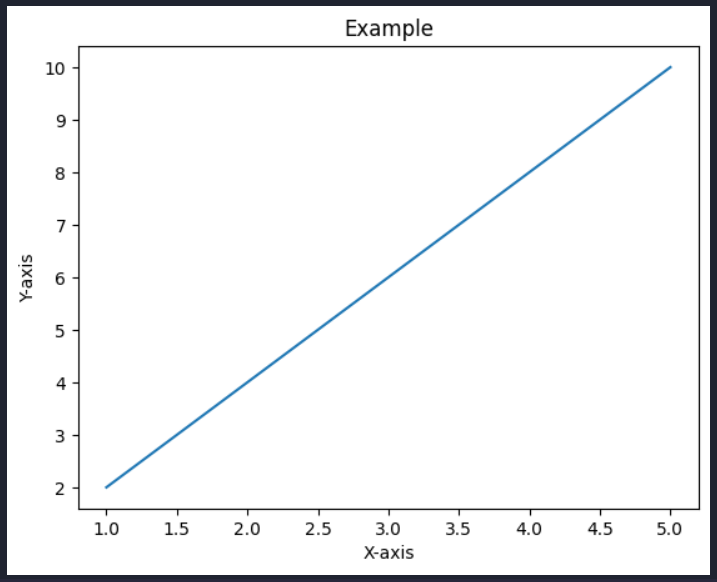
# DF 생성
df = pd.DataFrame({
        "A" : [1,2,3,4,5],
        "B" : [5,4,3,2,1]
})
df
plot() - 그래프 그리기
# 그래프 그리기 - plot()
df.plot(x="A", y="B")
plt.show()
스타일 설정
# 스타일 설정
df.plot(x='A', y='B', color='green', linestyle='--', marker='o')
plt.show()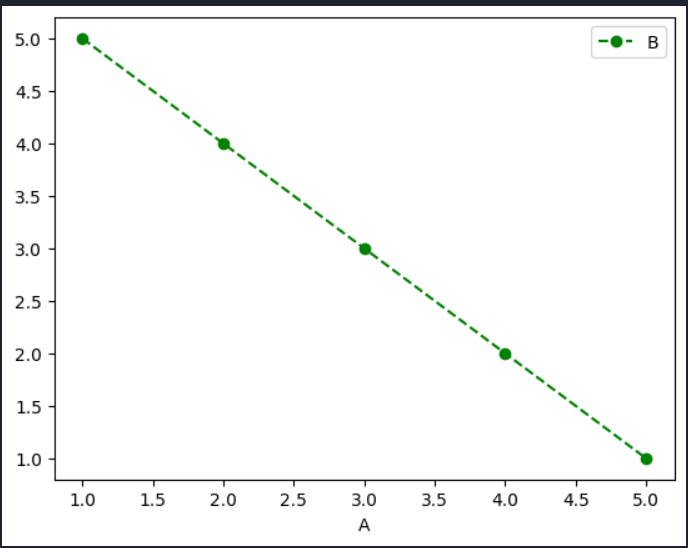
라벨 추가
# 범례 추가
df.plot(x="A", y="B", color="red", linestyle="--", marker="o", \
        label="Data Series")
plt.show()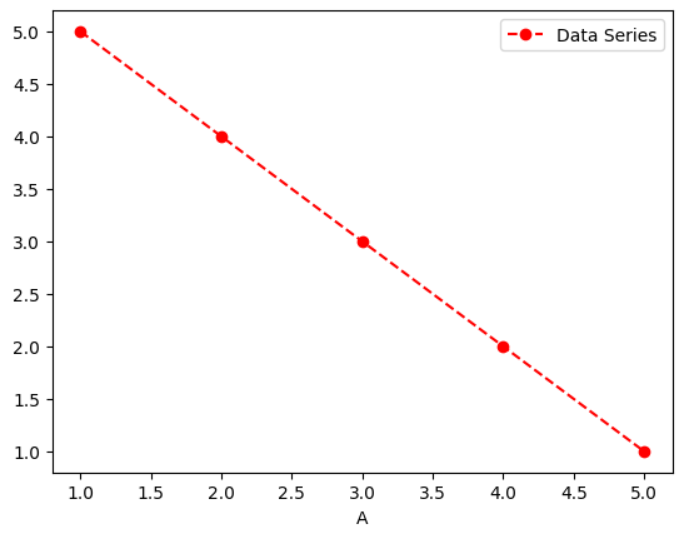
.legend()
: label 추가와 동일
# .legend() : label 붙이기랑 동일
ax = df.plot(x="A", y="B", color="red", linestyle="--", marker="o")
ax.legend(["Data Series"])
plt.show()
.set
: 축, 제목 입력하기
.text
: 내용 입력하기
# .set : 축, 제목 입력하기
# .text : 내용 입력하기
ax = df.plot(x="A", y="B", color="red", linestyle="--", marker="o")
ax.legend(["Data Series"])
ax.set_xlabel("X-axis")
ax.set_ylabel("Y-axis")
ax.set_title("Title Title Title")
ax.text(4, 3, "HiHi Text", fontsize=15)
ax.text(2, 2, "HiHi Text2", fontsize=10)
plt.show()
그래프 사이즈 변경
# 그래프 사이즈 변경
plt.Figure(figsize=(8,6))

x = [1,2,3,4,5]
y = [2,4,6,8,10]

plt.plot(x,y)
plt.show()
# 그래프 사이즈 변경
fig, ax = plt.subplots(figsize=(18,6))
ax = df.plot(x="A", y="B", color="red", linestyle="--", marker="o", ax=ax)
ax.legend(["Data Series"])
ax.set_xlabel("X-axis")
ax.set_ylabel("Y-axis")
ax.set_title("Title Title Title")
ax.text(4, 3, "HiHi Text", fontsize=15)
ax.text(2, 2, "HiHi Text2", fontsize=10)
plt.show()
import seaborn as sns
data = sns.load_dataset("flights")
data_grouped = data[["year", "passengers"]].groupby("year").sum().reset_index()
data_grouped
# Line 그리기
plt.plot(data_grouped["year"], data_grouped["passengers"])
plt.xlabel("year")
plt.ylabel("passengers")
plt.show()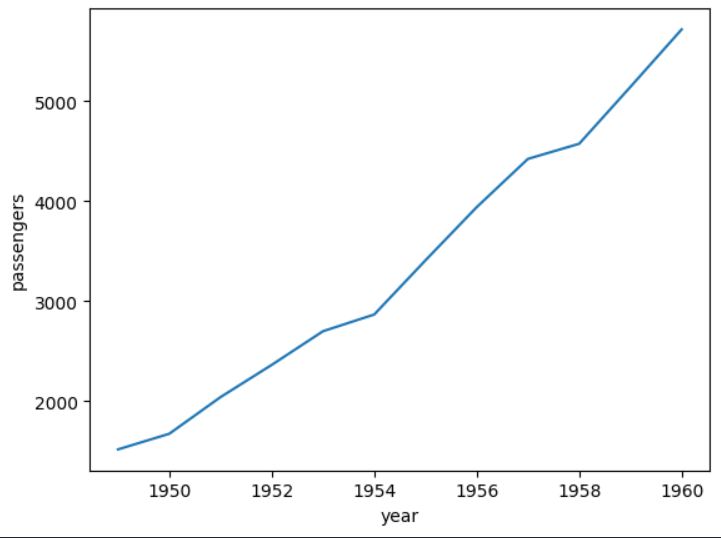
🔰 Bar plot
# 각각의 막대로 값의 크기를 비교하는데 효과적
# DF 생성
df = pd.DataFrame({
    "도시" : ["서울", "인천", "부산", "포항"],
    "인구" : [990, 300, 290, 250]
})

df
# bar : 각각의 막대로 값의 크기를 비교하는데 효과적

plt.bar(df["도시"], df["인구"])
plt.xlabel("도시")
plt.ylabel("인구")
plt.title("도시별 인구 수")
plt.show()

🔰 Histogram
# 연속적인 데이터의 분포를 보여주는 그래프. 빈도를 시각화.
import numpy as np

data = np.random.rand(1000)
data.shape

>>>
(1000,)
# Histogram : 연속적인 데이터의 분포를 보여주는 그래프. 빈도를 시각화.
# bins = 구간 범위

plt.hist(data, bins=30)
plt.xlabel("Value")
plt.ylabel("Frequency")
plt.title("Histogram")
plt.show()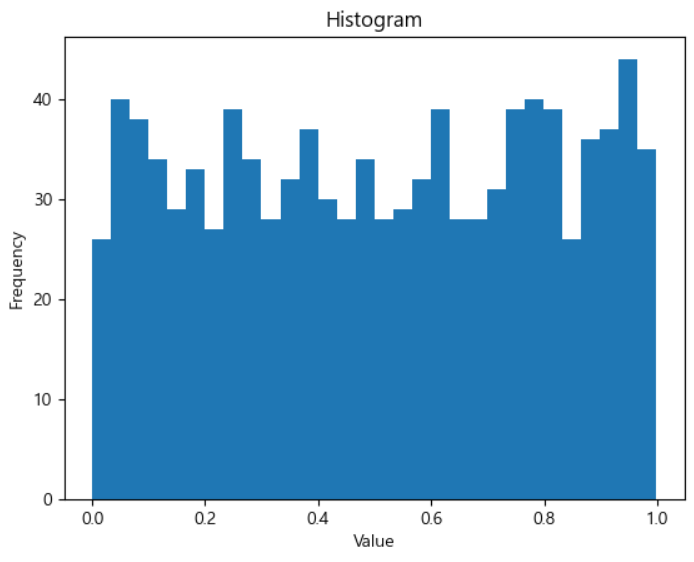
🔰 Pie Chart
# 전체 데이터에서 각 부분의 비율을 보여주는 차트
# 카테고리별 비율을 비교하거나,
# 범주형 데이터들간에 가지고 있는 값을 어느정도 비율로 분포 되어있는지 확인
# pie 차트

sizes = [30, 20, 25, 15, 10]
labels = ["A", "B", "C", "D", "E"]

plt.pie(sizes, labels=labels)
plt.title("Pie Chart")
plt.show()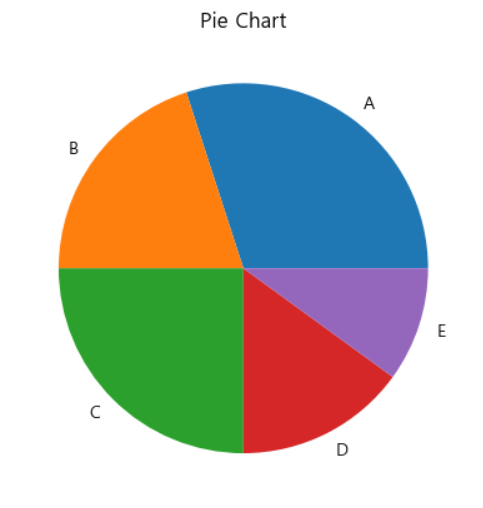
🔰 Box Plot
# 데이터의 분포와 이상치를 시각적으로 보여주는 그래프
# 데이터의 통계적 특성에 대해 파악하는데 용이
# Box plot

import seaborn as sns

iris = sns.load_dataset("iris")
iris
# species 안의 유니크 값이 무엇인지

species = iris["species"].unique()
species
# species 를 돌면서 sepal_lengths 값을 넣고 리스트 만들기

sepal_lengths_list = [iris[iris["species"] == s]\
                      ["sepal_length"].tolist() for s in species]

print(len(sepal_lengths_list))          # 3
print(len(sepal_lengths_list[0]))       # 50
print(len(sepal_lengths_list[1]))       # 50
print(len(sepal_lengths_list[2]))       # 50
plt.boxplot(sepal_lengths_list, labels=species)
plt.xlabel("Species")
plt.ylabel("Sepal Length")
plt.title("Box plot")
plt.show()
# seaborn 을 활용한 boxplot 만들기
sns.boxplot(x="species", y="sepal_length", data=iris)
plt.show()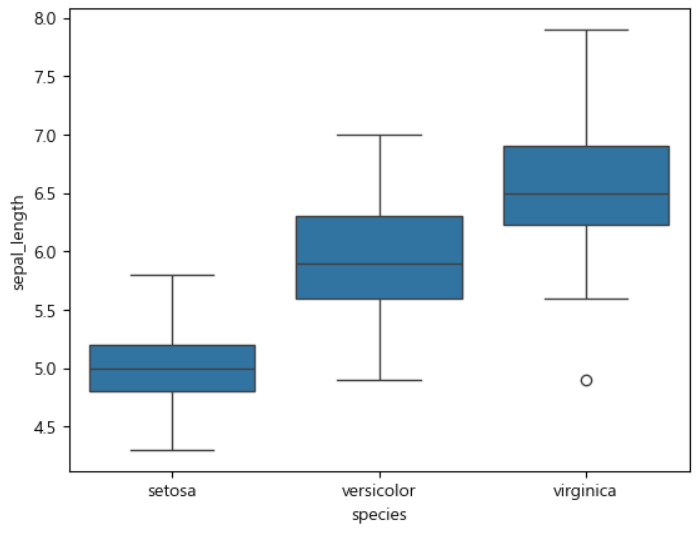
🔰 Scatter Plot
# 산점도. 두 변수 간의 관계를 점으로 표시해서 보여주는 그래프
# 상관 분석을 하거나 여러 변수들의 관계성 확인할 때 사용
# Scatter 차트

plt.scatter(iris["petal_length"], iris["petal_width"])
plt.xlabel("Petal Length")
plt.ylabel("Petal Width")
plt.show()      # 어느정도 상관 관계가 있어보임
plt.scatter(iris["sepal_length"], iris["sepal_width"])
plt.xlabel("Sepal Length")
plt.ylabel("Sepal Width")
plt.show()      # 상관 관계가 전혀 없어보임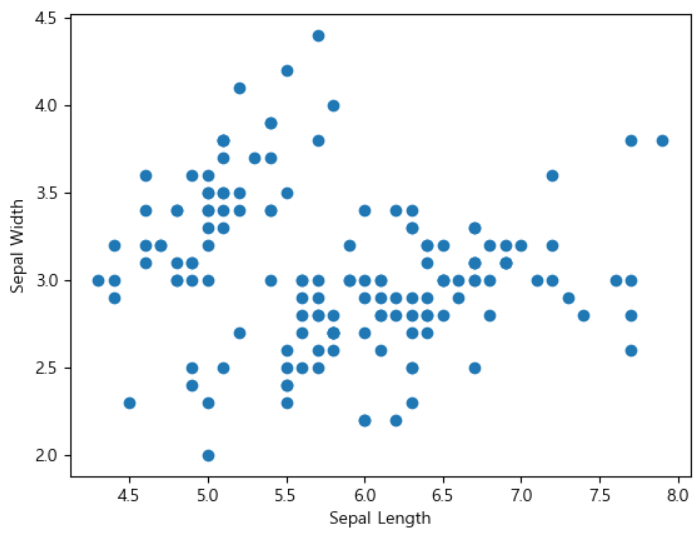
corr
# 각각의 상관성을 수치화해서 각 변수마다 상관계수를 가지고, 서로 얼마나 관련이 있는지를 확인할 수 있는 메서드.
# str 문자열 있는 걸 가지고 corr 하면 오류남
# corr(numeric_only=True) => 숫자 형태의 변수들만 가지고 상관성을 나타나겠다
# corr

iris.corr(numeric_only=True)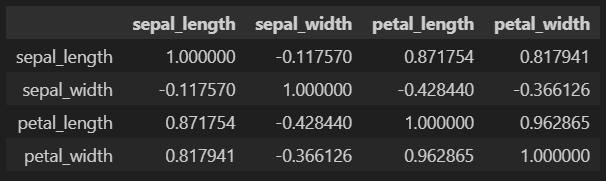
❓ 한글이 나오지 않는다면 ❓
더보기
import matplotlib.pyplot as plt
import matplotlib.font_manager as fm

font_path = "C:\Windows\Fonts/malgun.ttf"
font_name = fm.FontProperties(fname=font_path).get_name()
plt.rc("font", family=font_name)
plt.rcParams["axes.unicode_minus"] = False

plt.plot([1,2,3], [4,5,6])
plt.title("한글제목")
plt.xlabel("x축")
plt.ylabel("y축")
plt.show()
'Sparta > Theory' 카테고리의 다른 글
| [250916] 통계 02 - 분포 (0) | 2025.09.16 |
|---|---|
| [250916] 통계 01 - 분석방법 (0) | 2025.09.16 |
| [250830] pandas (1) | 2025.09.01 |
| [250829] 스파르타코딩 본캠프 19일차 (1) - pandas 02 (0) | 2025.08.29 |
| [250828] 스파르타코딩 본캠프 18일차 (1) - pandas 01 (2) | 2025.08.28 |