


# %%
import pandas as pd
import matplotlib as mpl
import matplotlib.pyplot as plt
import seaborn as sns
from matplotlib import font_manager as fm
from matplotlib.ticker import FuncFormatter

mpl.rcParams['axes.unicode_minus'] = False
font_path = r"C:\Users\Junecho\AppData\Local\Microsoft\Windows\Fonts\Paperlogy-6SemiBold.ttf"
prop = fm.FontProperties(fname=font_path)

std_barcolor = "#999999"
max_barcolor = "#e84c77"
min_barcolor = "#393434"
std_fontcolor = "#404345"
max_fontcolor = "r"
min_fontcolor = "b"

df = pd.read_csv("2018~2024.csv")
df.shape
df

# %%
# 전체 거래량 중 소형 평수 거래 비중
# s_width = 건물면적 60 언더만
pie_list = []
s_width = (df["건물면적(㎡)"] <= 60).copy()

# 건물 면적 60 언더 총 갯수  /   건물 총 개수 - 건물 면적 60 언더 총 갯수    를 pie_list 에다가 append
pie_list.append(df[s_width].count().values[0])
pie_list.append(df.count().values[0] - df[s_width].count().values[0])
pie_list

custom_colors = [max_barcolor, std_barcolor]
labels = ["소형", "소형 외"]

plt.pie(pie_list, autopct="%1.1f%%", colors=custom_colors, explode=[0, 0.03], textprops={"fontproperties": prop, "fontsize": 13})
plt.axis("equal")
plt.title("전체 거래량 중 소형 평수 거래 비중 ", fontproperties=prop, size=20)
plt.legend(labels=labels, loc="best", prop=prop)
plt.tight_layout()
plt.show()

# %%
stype = df[s_width]
stype_mean = stype.groupby(["자치구명"])["물건금액(만원)"].describe()
stype_median = stype.groupby(["자치구명"])["물건금액(만원)"].median()
stype_width = stype.groupby(["자치구명"])["건물면적(㎡)"].describe()
stype_year = stype.groupby(["자치구명"])["건축년도"].describe()
stype_mean
stype_median
stype_width
stype_year

# %%
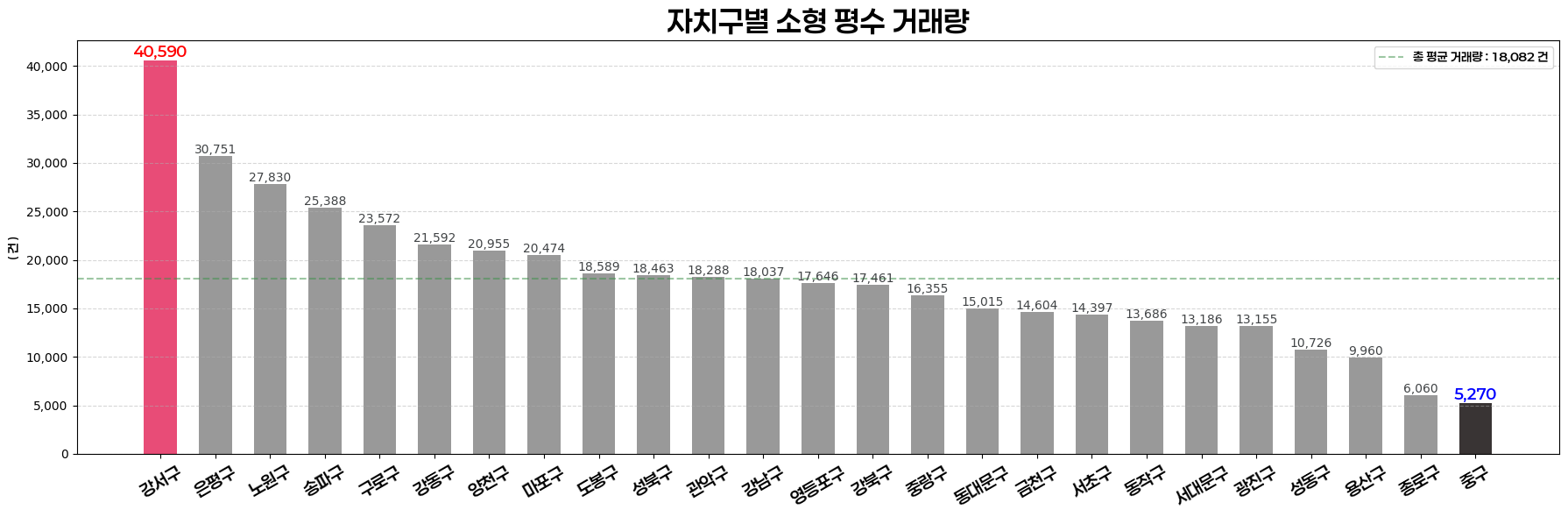
# 자치구별 소형 평수 거래량 => 1등 강서구 / 꼴등 중구
stype_mean = stype_mean.sort_values("count", ascending=False)

fig, ax = plt.subplots(figsize=(18, 6))
bars = plt.bar(stype_mean.index, stype_mean["count"], color=std_barcolor, width=0.6)
plt.xticks(rotation=30, fontproperties=prop, fontsize=14)
plt.ylabel("( 건 )", fontproperties=prop)
plt.title("자치구별 소형 평수 거래량", fontweight="bold", fontproperties=prop, fontsize=24)

formatter = FuncFormatter(lambda x, pos: f'{x:,.0f}')
plt.gca().yaxis.set_major_formatter(formatter)

# 평균선 추가 코드
stype_count_avg = stype_mean["count"].mean().round()
avg_txt = ax.axhline(stype_count_avg, color="#3c9148", linestyle='--', alpha=0.5, label=f"총 평균 거래량 : {stype_count_avg:,.0f} 건")

# count값 제일 크고 작은 index 반환
# bar[index] 의 set_facecolor로 1등과 꼴지의 bar 색상 변경
stype_count_max_index = stype_mean["count"].idxmax()
stype_count_min_index = stype_mean["count"].idxmin()
bars[stype_mean.index.get_loc(stype_count_max_index)].set_facecolor(max_barcolor)
bars[stype_mean.index.get_loc(stype_count_min_index)].set_facecolor(min_barcolor)

# 막대 위에 텍스트 출력 코드
# bars의 x,y 값을 i,j로 돌려라.
# i가 bars의 x =0 이면 red (즉 stype_mean.index 가 0이면)
# i가 bars의 x = 인덱스마지막 이면 blue (즉 stype_mean.index 가 인덱스 마지막이면)
# 둘 다 아니면 std_fontcolor 컬러로 바 색상을 변경시켜서 출력시킴
for i, j in enumerate(bars):
    height = j.get_height()
    if i == 0:
        ax.text(j.get_x() + j.get_width() / 2., height, f'{height:,.0f}', \
                ha="center", va="bottom", size=12, weight="semibold", color="r", fontproperties=prop)
    elif i == len(bars) - 1:
            ax.text(j.get_x() + j.get_width() / 2., height, f'{height:,.0f}', \
                ha="center", va="bottom", size=12, weight="semibold", color="b", fontproperties=prop)
    else:
        ax.text(j.get_x() + j.get_width() / 2., height, f'{height:,.0f}', \
            ha="center", va="bottom", size=10, color=std_fontcolor)

plt.grid(axis="y", linestyle="--", alpha=0.5)
ax.legend(prop=prop)
plt.tight_layout()
plt.show()

# %%
# stype_median 리셋 인덱스 1번만 하기
stype_median = stype_median.sort_values(ascending=False).reset_index()

# %%
# 자치구별 소형 평수 평균 거래가 ///// median 값으로 뽑은 결과물
stype_median = stype_median.sort_values("물건금액(만원)", ascending=False)
stype_median

fig, ax = plt.subplots(figsize=(18, 6))
bars = plt.bar(stype_median["자치구명"], stype_median["물건금액(만원)"], color=std_barcolor, width=0.6)
plt.xticks(rotation=30, fontproperties=prop, fontsize=14)
plt.ylabel("( 만원 )", fontproperties=prop)
plt.title("자치구별 소형 평수 평균 거래가", fontweight="bold", fontproperties=prop, fontsize=24)

formatter = FuncFormatter(lambda x, pos: f'{x:,.0f}')
plt.gca().yaxis.set_major_formatter(formatter)

# 평균선 추가 코드
stype_median_avg = stype_median["물건금액(만원)"].mean()
avg_txt = ax.axhline(stype_median_avg, color="#3c9148", linestyle="--", alpha=0.5, label=f"총 평균 거래량 : {stype_median_avg:,.0f} 건")

# count값 제일 크고 작은 index 반환
# bar[index] 의 set_facecolor로 1등과 꼴지의 bar 색상 변경
stype_median_max_index = stype_median["물건금액(만원)"].idxmax()
stype_median_min_index = stype_median["물건금액(만원)"].idxmin()
bars[stype_median.index.get_loc(stype_median_max_index)].set_facecolor(max_barcolor)
bars[stype_median.index.get_loc(stype_median_min_index)].set_facecolor(min_barcolor)

# 막대 위에 텍스트 출력 코드
# bars의 x,y 값을 i,j로 돌려라.
# i가 bars의 x =0 이면 red (즉 stype_mean.index 가 0이면)
# i가 bars의 x = 인덱스마지막 이면 blue (즉 stype_mean.index 가 인덱스 마지막이면)
# 둘 다 아니면 std_fontcolor 컬러로 바 색상을 변경시켜서 출력시킴
for i, j in enumerate(bars):
    height = j.get_height()
    if i == 0:
        ax.text(j.get_x() + j.get_width() / 2., height, f'{height:,.0f}', \
                ha="center", va="bottom", size=12, weight="semibold", color="r", fontproperties=prop)
    elif i == len(bars) - 1:
            ax.text(j.get_x() + j.get_width() / 2., height, f'{height:,.0f}', \
                ha="center", va="bottom", size=12, weight="semibold", color="b", fontproperties=prop)
    else:
        ax.text(j.get_x() + j.get_width() / 2., height, f'{height:,.0f}', \
            ha="center", va="bottom", size=10, color=std_fontcolor)

plt.grid(axis="y", linestyle="--", alpha=0.5)
ax.legend(prop=prop)
plt.tight_layout()
plt.show()

# %%
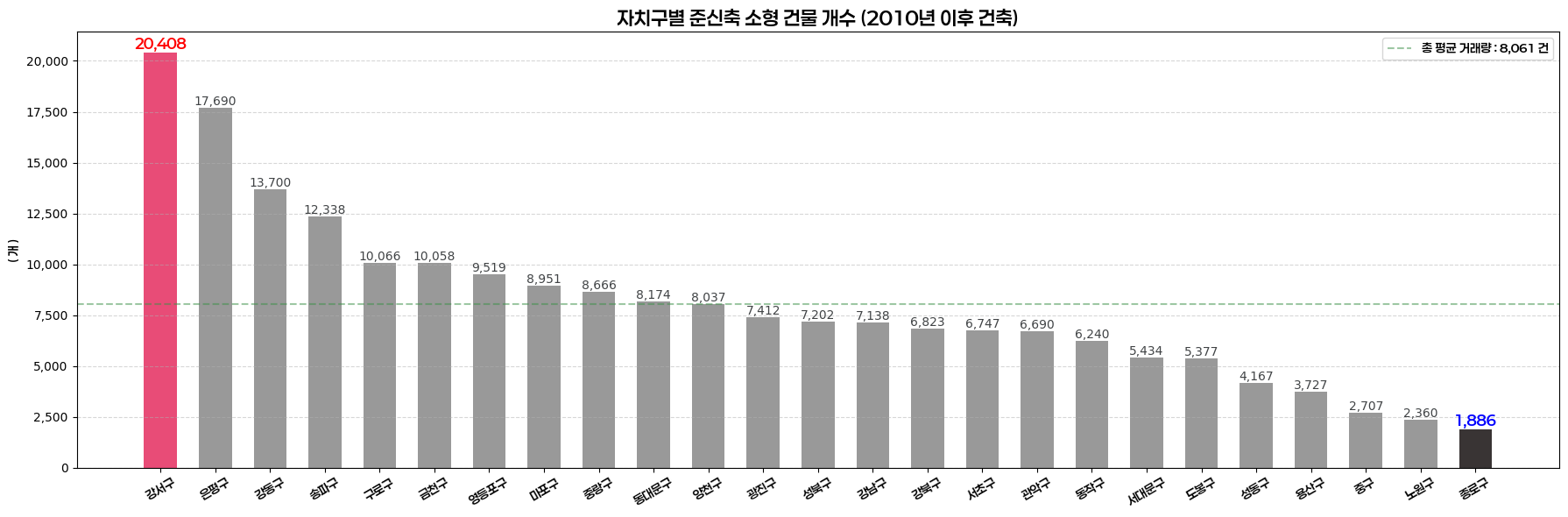
# 자치구별 준신축 소형 건물 개수 (2010년 이후 건축) => 1등 강서구 / 꼴등 종로구
new_bulid_df = df[(df["건축년도"] >= 2010 ) & (df["건물면적(㎡)"] <= 60)].copy()
new_bulid_count = new_bulid_df.groupby("자치구명")["물건금액(만원)"].describe()
new_bulid_count = new_bulid_count.sort_values("count", ascending=False)

fig, ax = plt.subplots(figsize=(18, 6))
bars = plt.bar(new_bulid_count.index, new_bulid_count["count"], color=std_barcolor , width=0.6)
plt.xticks(rotation=30, fontproperties=prop)
plt.xlabel("")
plt.ylabel("( 개 )", fontproperties=prop)
plt.title("자치구별 준신축 소형 건물 개수 (2010년 이후 건축)", fontweight="bold", fontproperties=prop, fontsize=16)

formatter = FuncFormatter(lambda x, pos: f'{x:,.0f}')
plt.gca().yaxis.set_major_formatter(formatter)

# 평균선 추가 코드
new_bulid_count_avg = new_bulid_count["count"].mean()
avg_txt = ax.axhline(new_bulid_count_avg, color="#3c9148", linestyle="--", alpha=0.5, label=f"총 평균 거래량 : {new_bulid_count_avg:,.0f} 건")

# count값 제일 크고 작은 index 반환
# bar[index] 의 set_facecolor로 1등과 꼴지의 bar 색상 변경
new_bulid_max_index = new_bulid_count["count"].idxmax()
new_bulid_min_index = new_bulid_count["count"].idxmin()
bars[new_bulid_count.index.get_loc(new_bulid_max_index)].set_facecolor(max_barcolor)
bars[new_bulid_count.index.get_loc(new_bulid_min_index)].set_facecolor(min_barcolor)

# 막대 위에 텍스트 출력 코드
# bars의 x,y 값을 i,j로 돌려라.
# i가 bars의 x =0 이면 red (즉 stype_mean.index 가 0이면)
# i가 bars의 x = 인덱스마지막 이면 blue (즉 stype_mean.index 가 인덱스 마지막이면)
# 둘 다 아니면 std_fontcolor 컬러로 바 색상을 변경시켜서 출력시킴
for i, j in enumerate(bars):
    height = j.get_height()
    if i == 0:
        ax.text(j.get_x() + j.get_width() / 2., height, f'{height:,.0f}', \
                ha="center", va="bottom", size=12, weight="semibold", color="r", fontproperties=prop)
    elif i == len(bars) - 1:
            ax.text(j.get_x() + j.get_width() / 2., height, f'{height:,.0f}', \
                ha="center", va="bottom", size=12, weight="semibold", color="b", fontproperties=prop)
    else:
        ax.text(j.get_x() + j.get_width() / 2., height, f'{height:,.0f}', \
            ha="center", va="bottom", size=10, color=std_fontcolor)

plt.grid(axis="y", linestyle="--", alpha=0.5)
ax.legend(prop=prop)
plt.tight_layout()
plt.show()

# %%
# allgu_df 에 new라는 컬럼을 새로 생성하는데, 건축년도가 2010년 이후면 1로 반환
allgu_df = df[(df["건축년도"] >= 2010 ) & (df["건물면적(㎡)"] <= 60)].copy()
allgu_df["new"] = (allgu_df["건축년도"] >= 2010).astype(int)
allgu_df

# agg 함수써서 여러 집계 함수 사용하면서 새로운 컬럼 생성
allgu = allgu_df.groupby("자치구명").agg(\
    allgu_avgprice=("물건금액(만원)", "median"), allgu_new_cnt=("new", "sum"), allgu_trade_cnt=("물건금액(만원)", "count")).reset_index()
allgu

fig, ax = plt.subplots(figsize=(14, 8))
s_scaler = 50

# scatter 로 시각화
# x -> 평균가격 / y -> 신축갯수 / s버블크기 -> 거래량
scatter = ax.scatter(
    x=allgu["allgu_avgprice"],
    y=allgu["allgu_new_cnt"],
    s=allgu["allgu_trade_cnt"],
    c=std_barcolor, alpha=0.5, edgecolors="#404345", linewidth=0.5
)

# iterrows : df의 각 행을 반복할 수 있는 반복자를 생성
# 이 메서드는 df 객체에서 직접 호출됨. dataframe.iterrows() 매개 변수 필요 없음
for i, row in allgu.iterrows():
    ax.text(row["allgu_avgprice"], row["allgu_new_cnt"], row["자치구명"], ha="center", va="center", fontproperties=prop, fontsize=14)

formatter = FuncFormatter(lambda x, pos: f'{x:,.0f}')
plt.gca().yaxis.set_major_formatter(formatter)
plt.gca().xaxis.set_major_formatter(formatter)

plt.xlabel("평균 가격 ( 만원 )", fontproperties=prop)
plt.ylabel("거래량 ( 건 )", fontproperties=prop)
plt.title("자치구별 가격/건축년도/거래량의 상관관계", fontproperties=prop, fontsize=18)
plt.tight_layout()
plt.grid(True, linestyle="--", alpha=0.5)
plt.show()

# %%
# allgu_df 에 new라는 컬럼을 새로 생성하는데, 건축년도가 2010년 이후면 1로 반환
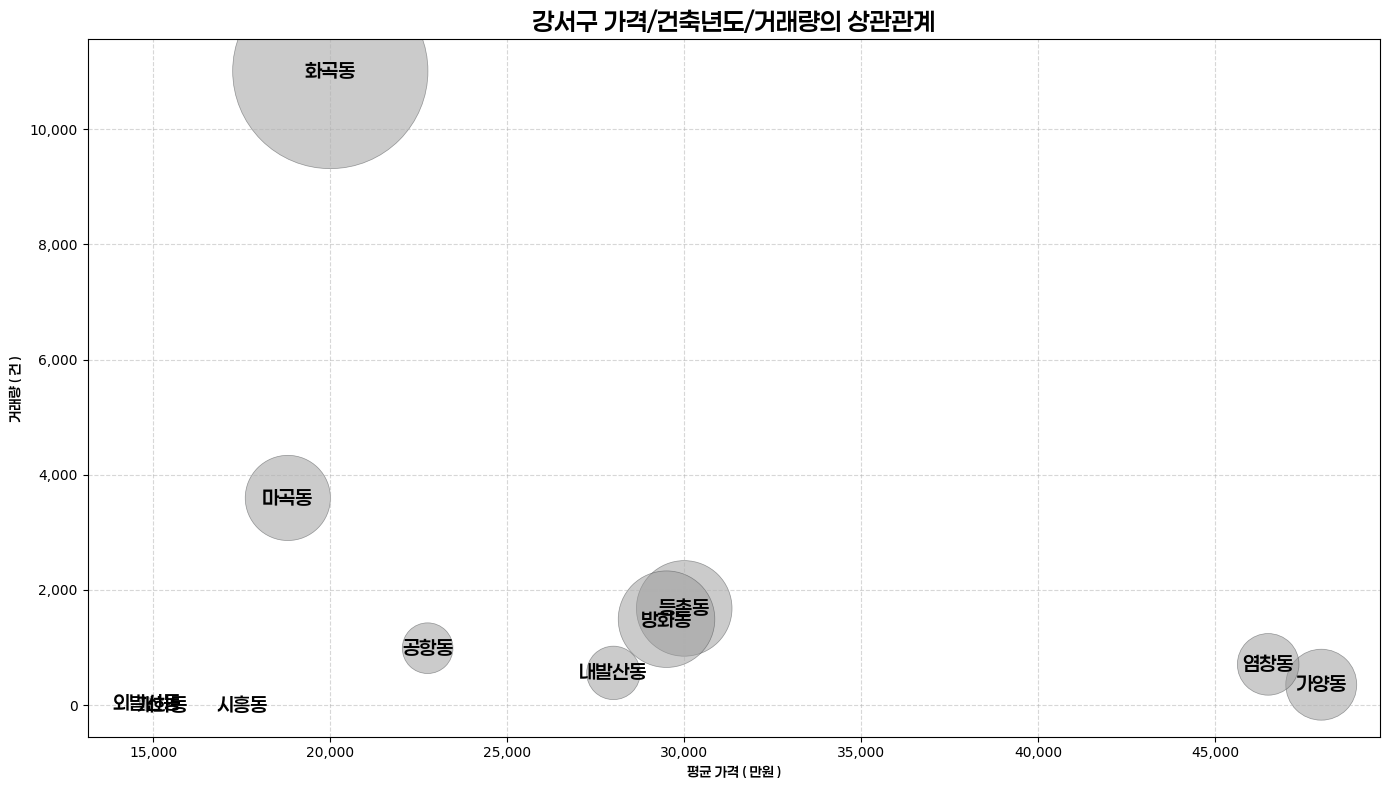
gangseo_df = df[(df["자치구명"] == "강서구") & (df["건물면적(㎡)"] <= 60)].copy()
gangseo_df["new"] = (allgu_df["건축년도"] >= 2010).astype(int)
gangseo_df

# agg 함수써서 여러 집계 함수 사용하면서 새로운 컬럼 생성
gandseo = gangseo_df.groupby("법정동명").agg(\
    allgu_avgprice=("물건금액(만원)", "median"), allgu_new_cnt=("new", "sum"), allgu_trade_cnt=("물건금액(만원)", "count")).reset_index()
gandseo

fig, ax = plt.subplots(figsize=(14, 8))
s_scaler = 50

# scatter 로 시각화
# x -> 평균가격 / y -> 신축갯수 / s버블크기 -> 거래량
scatter = ax.scatter(
    x=gandseo["allgu_avgprice"],
    y=gandseo["allgu_new_cnt"],
    s=gandseo["allgu_trade_cnt"],
    c=std_barcolor, alpha=0.5, edgecolors="#404345", linewidth=0.5
)

# iterrows : df의 각 행을 반복할 수 있는 반복자를 생성
# 이 메서드는 df 객체에서 직접 호출됨. dataframe.iterrows() 매개 변수 필요 없음
for i, row in gandseo.iterrows():
    ax.text(row["allgu_avgprice"], row["allgu_new_cnt"], row["법정동명"], ha="center", va="center", fontproperties=prop, fontsize=14)

formatter = FuncFormatter(lambda x, pos: f'{x:,.0f}')
plt.gca().yaxis.set_major_formatter(formatter)
plt.gca().xaxis.set_major_formatter(formatter)

plt.xlabel("평균 가격 ( 만원 )", fontproperties=prop)
plt.ylabel("거래량 ( 건 )", fontproperties=prop)
plt.title("강서구 가격/건축년도/거래량의 상관관계", fontproperties=prop, fontsize=18)
plt.tight_layout()
plt.grid(True, linestyle="--", alpha=0.5)
plt.show()

# %%
# allgu_df 에 new라는 컬럼을 새로 생성하는데, 건축년도가 2010년 이후면 1로 반환
enpyung_df = df[(df["자치구명"] == "은평구") & (df["건물면적(㎡)"] <= 60)].copy()
enpyung_df["new"] = (allgu_df["건축년도"] >= 2010).astype(int)
enpyung_df

# agg 함수써서 여러 집계 함수 사용하면서 새로운 컬럼 생성
enpyung = enpyung_df.groupby("법정동명").agg(\
    allgu_avgprice=("물건금액(만원)", "median"), allgu_new_cnt=("new", "sum"), allgu_trade_cnt=("물건금액(만원)", "count")).reset_index()
enpyung

fig, ax = plt.subplots(figsize=(14, 8))
s_scaler = 50

# scatter 로 시각화
# x -> 평균가격 / y -> 신축갯수 / s버블크기 -> 거래량
scatter = ax.scatter(
    x=enpyung["allgu_avgprice"],
    y=enpyung["allgu_new_cnt"],
    s=enpyung["allgu_trade_cnt"],
    c=std_barcolor, alpha=0.5, edgecolors="#404345", linewidth=0.5
)

# iterrows : df의 각 행을 반복할 수 있는 반복자를 생성
# 이 메서드는 df 객체에서 직접 호출됨. dataframe.iterrows() 매개 변수 필요 없음
for i, row in enpyung.iterrows():
    ax.text(row["allgu_avgprice"], row["allgu_new_cnt"], row["법정동명"], ha="center", va="center", fontproperties=prop, fontsize=14)

formatter = FuncFormatter(lambda x, pos: f'{x:,.0f}')
plt.gca().yaxis.set_major_formatter(formatter)
plt.gca().xaxis.set_major_formatter(formatter)

plt.xlabel("평균 가격 ( 만원 )", fontproperties=prop)
plt.ylabel("거래량 ( 건 )", fontproperties=prop)
plt.title("은평구 가격/건축년도/거래량의 상관관계", fontproperties=prop, fontsize=18)
plt.tight_layout()
plt.grid(True, linestyle="--", alpha=0.5)
plt.show()

# %%
stype_cnt = stype.groupby(["계약년도"])["물건금액(만원)"].describe()
stype_median = stype.groupby(["계약년도"])["물건금액(만원)"].median()

plt.plot(stype_cnt.index, stype_cnt["count"], color="b", linestyle="-", marker="o", label="Data Series")
plt.title("연도별 소형 거래량", fontweight="bold", fontproperties=prop, fontsize=24)
plt.tight_layout()
plt.grid(axis="y", linestyle="--", alpha=0.5)

plt.plot(stype_median.index, stype_median.values, color="b", linestyle="-", marker="o", label="Data Series")
plt.title("연도별 소형 평균가", fontweight="bold", fontproperties=prop, fontsize=24)
plt.tight_layout()
plt.grid(axis="y", linestyle="--", alpha=0.5)

sns.lineplot(stype_cnt.index, stype_cnt["count"],
            data=stype_cnt,
            marker = 'o',
            label='소형평수 연도별 가격 추세선',
            ax = ax
)

sns.lineplot(stype_median.index, stype_median.values,
            data=stype_median,
            marker = 'o',
            label='소형평수 연도별 거래량 추세선',
            ax=ax
)

formatter = FuncFormatter(lambda x, pos: f'{x:,.0f}')  # 쉼표를 추가한 포맷
plt.gca().yaxis.set_major_formatter(formatter)  # 왼쪽 y축에 적용

# 무조건 들어가는 코드
plt.grid(axis="y", linestyle="--",alpha=0.5)

plt.xlabel("계약연도", fontproperties=prop)
plt.ylabel('(건) or (만원)', fontproperties=prop)
plt.legend(prop=prop)
plt.ylim([0,100000])
plt.show()
너무 바빠여 . . ....
PPT도 만들어야됨
눙물이 나는겨 . . ..
'Sparta > Normal' 카테고리의 다른 글
| [250912] 스파르타코딩 본캠프 29일차 (2) | 2025.09.12 |
|---|---|
| [250910] 스파르타코딩 본캠프 27일차 (0) | 2025.09.10 |
| [250908] 스파르타코딩 본캠프 25일차 (1) | 2025.09.08 |
| [250905] 스파르타코딩 본캠프 24일차 (0) | 2025.09.05 |